 YoutubeTools
Video Bitrate Calculator
Calculate video bitrate from a target file size and runtime. Set aside audio bitrate and optional overhead, and get results in Mbps and kbps.

Related guides

Start with the target file size in bytes, multiply by eight and divide by runtime in seconds. Convert to Mbps, then subtract the audio bitrate and any overhead reserve to get the video budget.

Multiply Mbps by 1,000 to get kbps. Divide kbps by 1,000 to get Mbps. These bitrate units use decimal prefixes, while file size can use decimal MB or binary MiB.
More creator tools



Work backward from a file-size limit
Enter the maximum output size, actual runtime, combined audio bitrate, and an optional overhead reserve. The calculator first converts the target size to bits and divides by duration. It then removes the reserve and audio budget. The result is an average video target, not a maximum bitrate or a streaming preset.
Check the default example
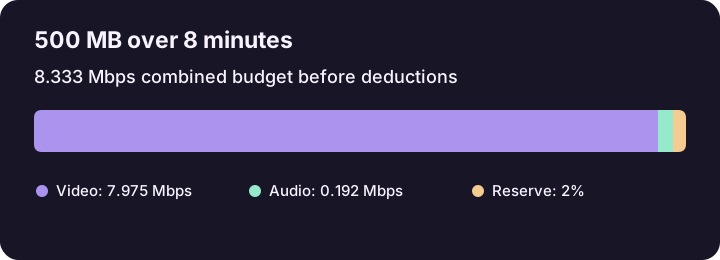
500 decimal MB is 4,000 megabits. For eight minutes, divide by 480 seconds to get 8.333 Mbps for all streams before deductions. Subtract 192 kbps, or 0.192 Mbps, for an 8.141 Mbps video target. If two audio tracks each use 192 kbps, enter 384 kbps as their combined rate. A 2% reserve lowers the one-track example to about 7.975 Mbps.
Choose the correct unit
MB and GB are decimal sizes. MiB and GiB use powers of two. Use the unit in your delivery limit and the bitrate unit your encoder expects. If the encoder asks for kbps, the displayed kbps value can be entered without converting it again.
Test the export before delivery
Render a representative scene with motion or small text and inspect quality at the intended size. Actual file size depends on the encoder and container, so check the full output's byte count. If audio and overhead already consume the budget, raise the cap, shorten the video, or change the audio allocation. If you already know the bitrate, use the file-size estimator to run the calculation in the other direction.