 YoutubeTools
All guides / Video export and bitrate
How to calculate video bitrate from file size
Start with the target file size in bytes, multiply by eight and divide by runtime in seconds.

Calculate the total budget
Convert the file size to bits, then divide by runtime in seconds. With decimal units, total Mbps equals size in MB × 8 ÷ seconds. If your source size is in MiB or GiB, convert to bytes first or select that unit in the calculator. Using MB for a limit expressed in MiB changes the budget.
Subtract what is not video
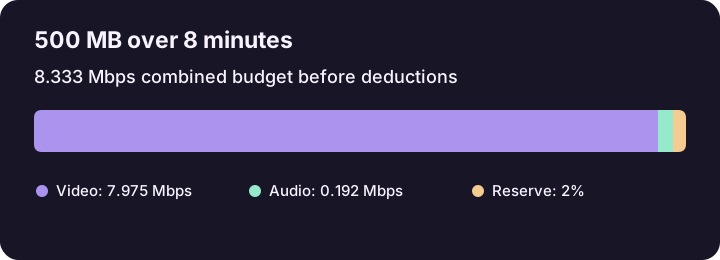
From the total average rate, reserve space for packaging and deduct all audio streams. For a 500 MB cap and 480 seconds, the total is 8.333 Mbps. A 2% reserve leaves 8.167 Mbps. Subtract 192 kbps audio to get approximately 7.975 Mbps for video. If there are two equal audio tracks, subtract 384 kbps instead.
Use average bitrate for size planning
Variable bitrate can spend more data during motion and less during a static scene. A peak value does not tell you what the whole file will weigh. For a strict upload cap, leave room for encoder variation and inspect the final file's actual byte count before delivery.
If the result is too low
Check the runtime and units first. For a positive but tight budget, render a representative section and examine detail in motion. If it looks poor, try a suitable lower resolution, another supported codec, or a larger delivery limit. A zero or negative video target means the audio and reserve already consume the budget.
Related tool

Calculate video bitrate from a target file size and runtime. Set aside audio bitrate and optional overhead, and get results in Mbps and kbps.
