 YoutubeTools
YouTube Thumbnail Downloader
Get the available image sizes for a public YouTube video or Short.

How to save a thumbnail
- Copy the share link for a public video or Short.
- Paste it above and get the available image sizes.
- Choose a size and save the JPG or copy its image link.
Available sizes depend on the video. Use images you own or have permission to reuse.
Explore creator tools
Find the available cover images for a Short and preview a vertical crop.
Compare up to two thumbnail drafts at desktop and mobile card sizes.
Crop a local image to the dimensions you enter and export it as a JPEG.
Create a share link that starts at the exact moment you choose.

Create a responsive, privacy-enhanced iframe for a video.
Calculate video bitrate from a target file size and runtime. Set aside audio bitrate and optional overhead, and get results in Mbps and kbps.
Browse all 21 tools for editing, sharing and planning.
See all toolsRelated guides
Copy the individual video's share link and paste it into the downloader. Choose a size based on the measured pixels shown in the result.
Check another size before concluding the video has no image. Some thumbnail requests return a small placeholder instead of the high-resolution variant.
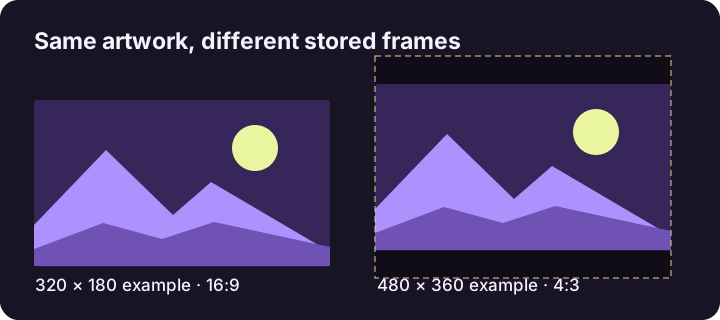
Read the stored image dimensions and compare its aspect ratio with the visible video artwork. Some image variants contain padding inside the file.
Use YouTube Help to choose your upload canvas. Use the measured dimensions in the downloader to know which public variant you actually saved.
Choose the thumbnail you need
Use the highest genuine resolution for a reference you need to inspect closely. For a document with many thumbnails, a smaller version saves space and still lets you identify the video. Read the dimensions on the card before saving. The order reflects the image variants that loaded, so a video without an HD image can start with a lower-resolution result.
Try a public video
Paste https://youtu.be/jNQXAC9IVRw to try an older upload. In a browser check, this link returned 480 × 360, 320 × 180, and 120 × 90 images. Available variants can change. Compare the 480 × 360 and 320 × 180 cards to see why a higher pixel count does not always mean the same framing: one image may include padding around its subject.
Save the JPG on your device
Use Download JPG on the card you want. If your browser cannot save a cross-origin image directly, use Open / save JPG and then the browser's image menu. Copy image link gives you the image address rather than a file. On a phone, paste into the input manually if the browser does not grant clipboard access.
Why an HD option is missing
Check that the pasted URL opens a single public video. Then inspect the cards that loaded. If the highest genuine image is smaller than expected, enlarging it will not recover detail. If it is your own upload, check your original asset for the sharper file. If every card is missing, try a different public video to distinguish a problem with that video from a network problem.
Use downloads responsibly
The tool retrieves public image variants. It does not retrieve the video, access private content, or give you permission to reuse someone else's artwork. For your own next upload, start from the original image and check its size and crop before publishing.